


YouTube marketing is no longer just "upload videos and hope." It's a search engine, a recommendation engine, a social network and a long-term content library in one. A single well-made video can keep bringing in viewers, leads and customers for years.
The scale of the opportunity is hard to ignore:
-
2+ billion logged-in users visit YouTube every month, according to YouTube's own press figures.
-
Tens of billions of dollars have been paid out to creators, artists, and media companies through the YouTube Partner Program, reflecting the platform's substantial economic footprint.
-
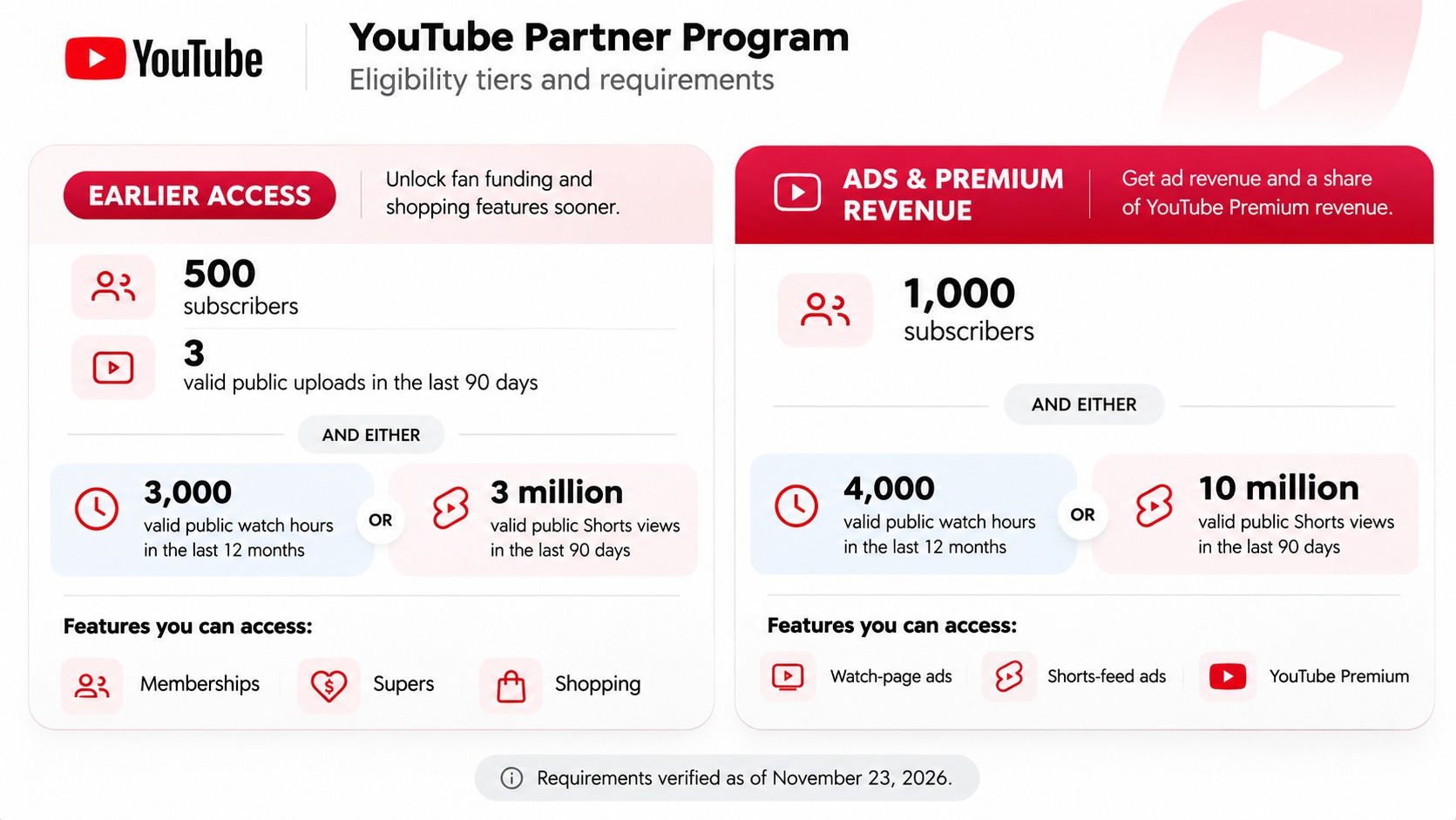
1,000 subscribers and 4,000 valid public watch hours (or 10 million valid public Shorts views in 90 days) are the requirements for the full YouTube Partner Program tier. A lower-threshold tier opens at 500 subscribers.
That opportunity comes with a problem. Most channels publish without a clear goal, treat titles and thumbnails as an affterthought, never open their analytics, and treat Google Search as a separate world. The result is uploads that go nowhere.
This guide covers how to plan a YouTube marketing strategy, optimize your channel and videos, earn discovery on both YouTube and Google, measure results, and build revenue from your audience. It's written for creators, marketers, small businesses and agencies, and it's honest about what is documented by Google and YouTube and what is industry experience.
Key Takeaways
-
Strategic foundation: Successful growth requires clear business goals, audience research, defined content pillars, and a consistent publishing cadence.
-
Analytics & retention: Performance hinges on optimizing click-through rates (CTR) and audience retention to turn impressions into sustained watch time.
-
Dual SEO optimization: Compelling packaging and structured metadata drive YouTube discovery, while crawlable pages and VideoObject schema capture Google Search visibility.
-
Full-funnel execution: Align organic content, Shorts, paid ads, and creator collaborations across all funnel stages to drive long-term revenue and leads.
What Is YouTube Marketing?
YouTube marketing is the practice of using YouTube videos, Shorts, livestreams, and channel features to reach an audience, build trust, and drive strategic outcomes like brand awareness, subscriber growth, leads, sales, or ad revenue.
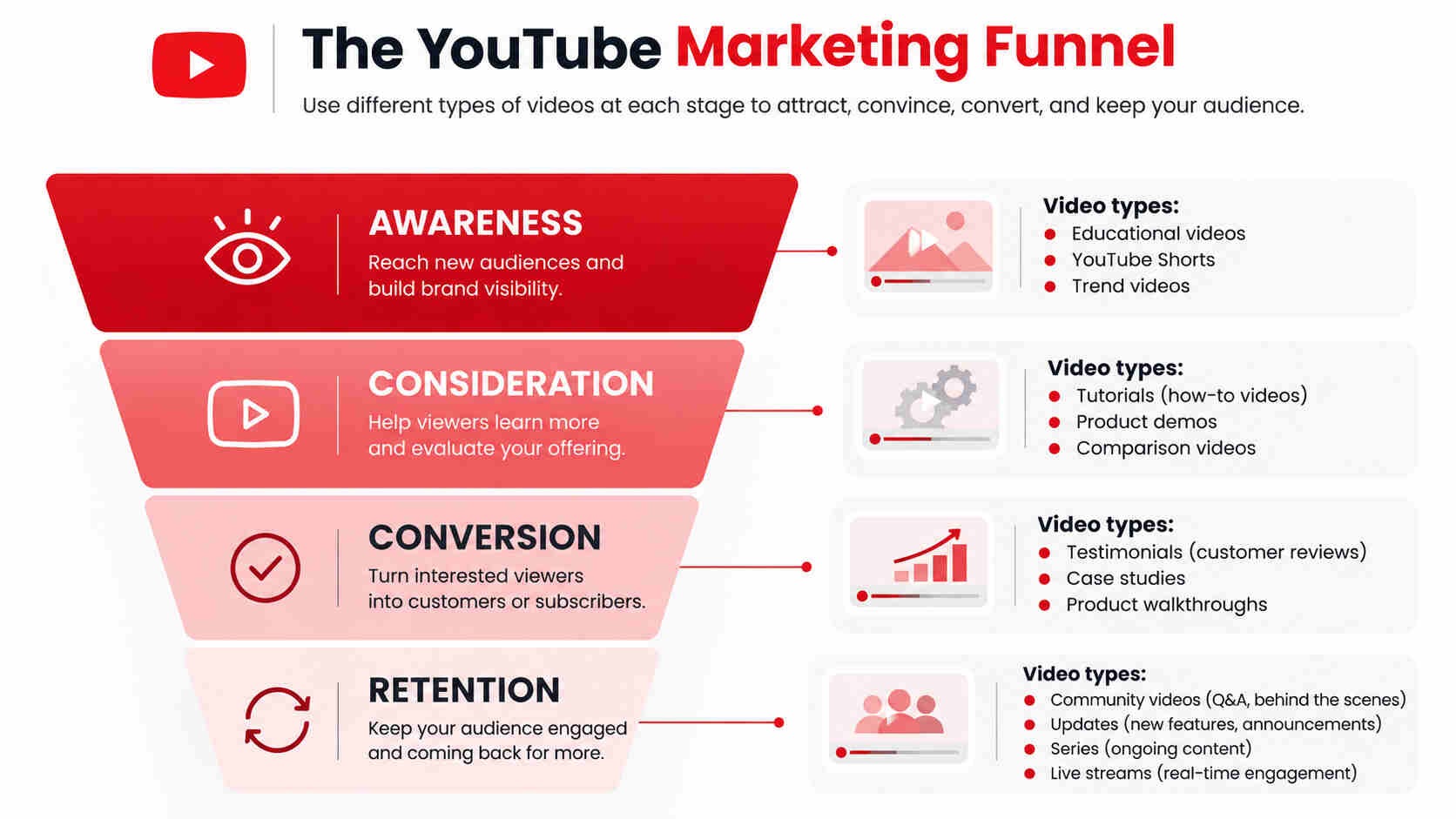
Effective YouTube marketing generally combines key strategic approaches:
-
Organic YouTube marketing: publishing and optimizing content so people find it through search, recommendations, shares and embeds.
-
Paid YouTube advertising: running video ads through Google Ads to reach defined audiences.
-
Influencer Marketing & Collaborations: Partnering with established creators to tap into their existing audiences and build social proof.
The strongest strategies combine organic video creation, paid targeted advertising, and creator collaborations to maximize reach, engagement, and conversion across the marketing funnel.
YouTube also sits alongside the rest of your marketing. The same video can support a blog post, an email, a landing page and a social campaign.
Why YouTube Marketing Matters for Businesses, Creators and Brands
The practical reasons the platform works for businesses, creators, and brands go beyond scale:
Search and discovery in one place
People search YouTube for tutorials, reviews and comparisons, often when they're actively looking for information or evaluating a product. YouTube's recommendation systems can also surface videos to viewers who weren't actively searching, helping brands reach new audiences.
Content longevity
A well-produced tutorial, review or educational video can continue attracting viewers months or even years after publication, unlike many social media posts that quickly lose visibility.
Trust and credibility
Seeing someone explain a topic, demonstrate a product or teach a skill can help a brand build credibility by offering viewers a more personal and informative experience.
Product education and support
Videos can demonstrate how products work, answer common questions and guide customers through processes, helping reduce confusion, support requests and friction in the buying journey.
Multiple revenue paths
A YouTube channel can support several revenue streams, including advertising, affiliate marketing, sponsorships, product sales, services and memberships, depending on the channel's audience and eligibility.
Cross-channel value
A single long-form video can be repurposed into Shorts, social clips, blog content and email material, allowing brands to extend the reach of their content across multiple marketing channels.
The main cost is time. Video production takes more effort than a text post, which is why strategy matters.
Setting Clear Goals for Your YouTube Marketing Strategy
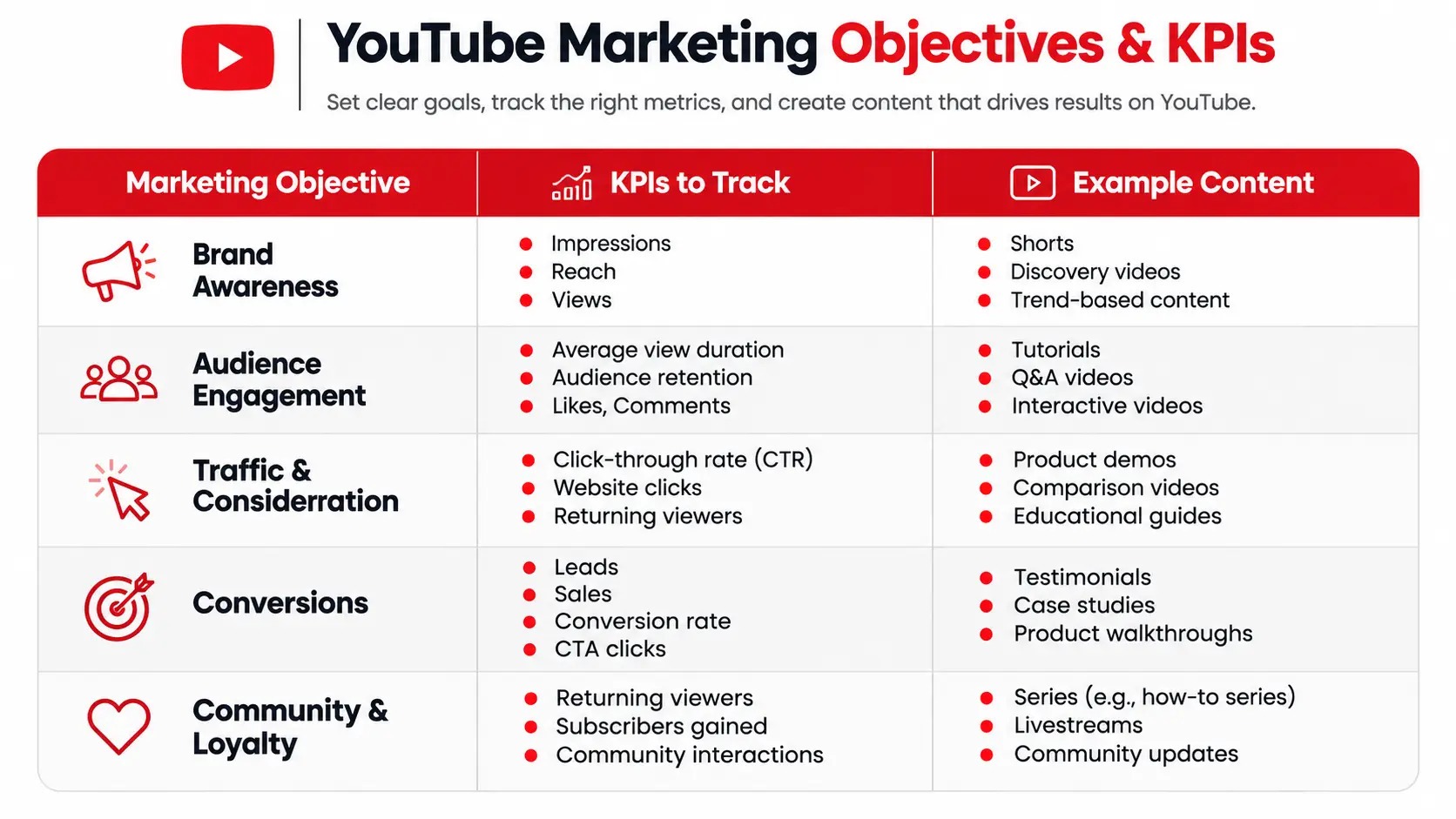
Goals determine what you publish, what you ask viewers to do and how you judge success. A channel built for lead generation looks very different from one built for ad revenue.
How to set realistic goals: use your own baseline. Check your last 28 or 90 days in YouTube Studio, choose one primary and one or two secondary objectives, and set targets relative to current performance.
A target like "improve click-through rate on new videos" is more useful than an arbitrary "10,000 subscribers in 90 days," because it points to something you can influence.
How to Create and Optimize Your YouTube Channel
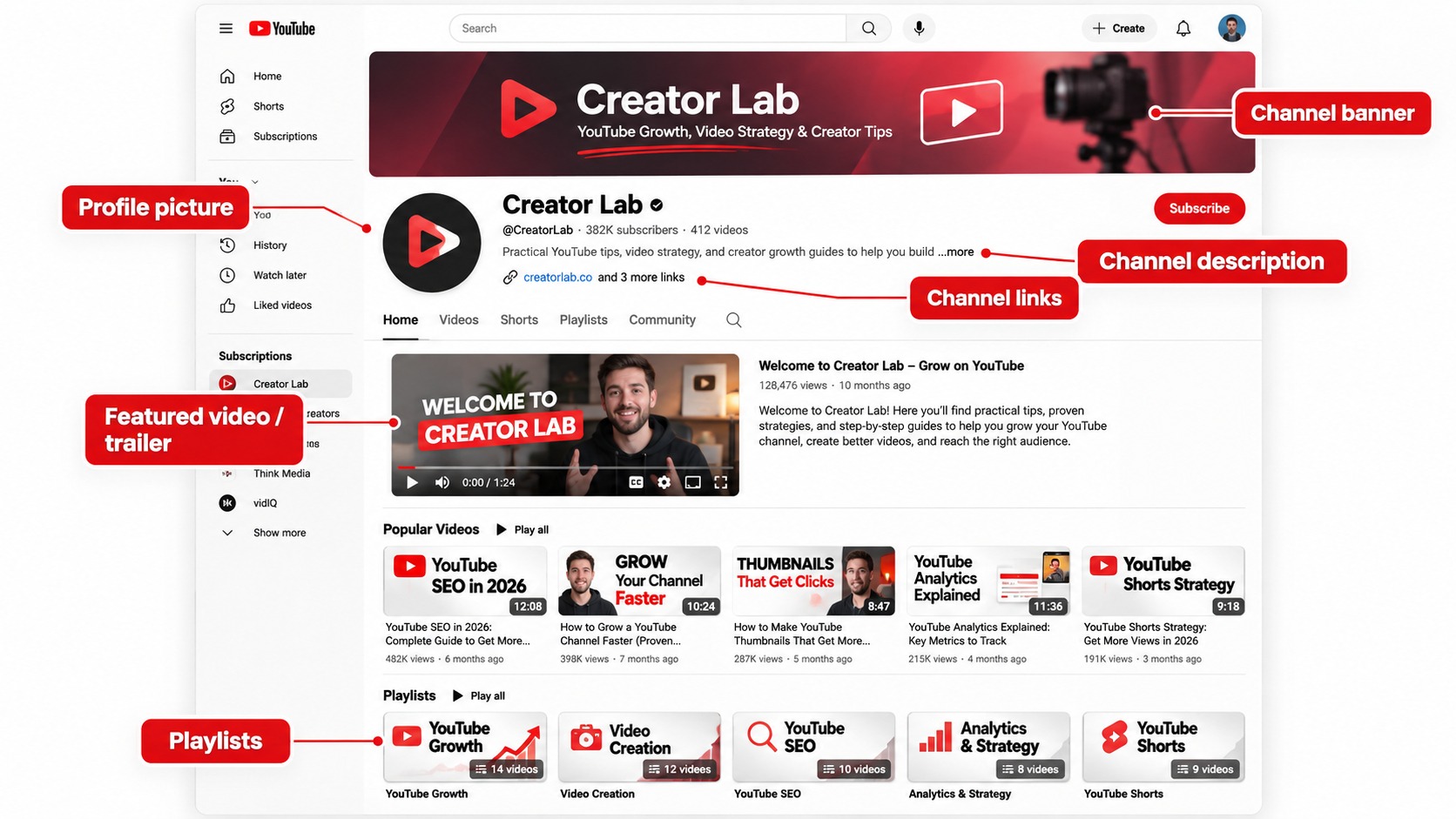
Your channel is your storefront. Viewers who like one video often check the channel before subscribing.
Setup checklist:
-
Create the channel. Follow YouTube's guide to creating a channel. Brands should consider a Brand Account so several people can manage it.
-
Choose a clear name and handle. Make them easy to spell and consistent with other platforms. YouTube explains how to change or claim a handle.
-
Add branding. A recognizable profile image, a banner that states what the channel offers and, ideally, a hint of your upload rhythm.
-
Write a useful description. Say who the channel is for, what they'll learn and why to subscribe. Put the most important information in the first lines, add relevant terms naturally and include your website.
-
Add links to your website, lead magnet or key social profiles.
-
Organize the homepage. Use a channel trailer or featured video for new visitors, a returning-subscriber spotlight, and sections for playlists or series.
-
Review channel settings. Channel keywords are a setup field that helps describe your channel's focus. Use them honestly and sparingly, and don't expect them to drive growth on their own.
If you need to reference your channel in integrations, analytics tools, API work or partner forms, the YouTube Channel ID tool helps you find the unique identifier without digging through settings.
Publishing settings: know the difference between public, private and unlisted before you upload. What "unlisted" means on YouTube matters for review links and staged releases, and YouTube documents each option in its video privacy settings guide. Unlisted videos are accessible to anyone with the link and aren't surfaced in search or on your channel. They also shouldn't be counted on for public watch-time goals.
How to Develop a YouTube Marketing Strategy
-
Define the audience
Describe who they are, what they struggle with, what they search for and what they already watch. Use YouTube Analytics audience insights, including demographics, viewing behavior and other channels your viewers watch, to refine this profile.
-
List their pain points and questions
Use customer emails, sales calls, comments, support tickets and community threads. Turn recurring questions and frustrations into video topics that address real problems rather than relying on assumptions about what viewers need.
-
Pick 3–5 content pillars
These are the recurring themes the channel owns. Content pillars help keep videos relevant to the channel's niche while giving viewers a consistent reason to return for related content.
-
Research competitors
Note which topics work for similar channels, how they package videos and where they are thin, outdated or too advanced for beginners. Compare their most viewed and recent videos to identify formats, topic patterns and opportunities to differentiate your content.
-
Identify gaps
Look for questions with poor answers, outdated tutorials or underserved audience levels. Prioritize topics where you can offer clearer explanations, more current information, a better demonstration or a perspective competitors have overlooked.
-
Map videos to funnel stages
Ensure the plan covers discovery, consideration and conversion content. Use educational videos to attract new viewers, comparison and problem-solving videos to build trust, and product-focused content to support decision-making.
-
Set a sustainable cadence
Choose a rhythm you can maintain for six months, not a heroic burst. Build a publishing calendar around your production capacity and use batch recording or repurposing to maintain consistency without sacrificing video quality.
-
Define metrics and review dates
Do this before you publish. Specifically, double-check your custom thumbnail for legibility on mobile devices, verify that all chapter timestamps and description links function correctly, and confirm that your target keywords are naturally integrated into your title and description.
Setting clear baseline targets for CTR and audience retention ahead of time ensures you can accurately gauge your video's initial performance in YouTube Studio.
Simple example: a project-management software company
-
Goal: product-qualified leads.
-
Audience: operations managers at small agencies.
-
Pillars: workflow tutorials, tool comparisons, client-management tips, product walkthroughs.
-
Content: a search-based tutorial ("How to manage client approvals in [tool type]"), a comparison, a customer story and a monthly product update.
-
Metrics: CTR, average view duration, clicks to the trial page and trial sign-ups by UTM.
How YouTube Works as a Search and Discovery Platform
Viewers find videos through several surfaces:
-
YouTube Search: active intent ("how to edit audio in Premiere").
-
Home: personalized recommendations.
-
Suggested videos: next-watch recommendations beside or after a video.
-
Shorts feed: swipe-based short-form discovery.
-
Playlists and channel pages: continued viewing within your catalog.
-
External sources: embeds, social shares, emails and links.
-
Google Search: video results that may link to YouTube or to pages with embedded videos.
Search is demand capture: someone has a question and your video answers it. Recommendations are demand creation: the viewer didn't search, but the system predicts interest.
YouTube describes its approach in How YouTube Works and its discovery and performance FAQs. The broad message is consistent: YouTube aims to show viewers videos they'll want to watch and be satisfied with.
Creators often hunt for secret ranking factors. YouTube doesn't publish an exact formula, so be skeptical of anyone claiming one.
The practical lesson is to match the viewer's intent, earn the click honestly, and keep them watching. If you want a deeper walk-through, see how to get recommended on YouTube.
YouTube Keyword Research: How to Find Video Topics People Search For
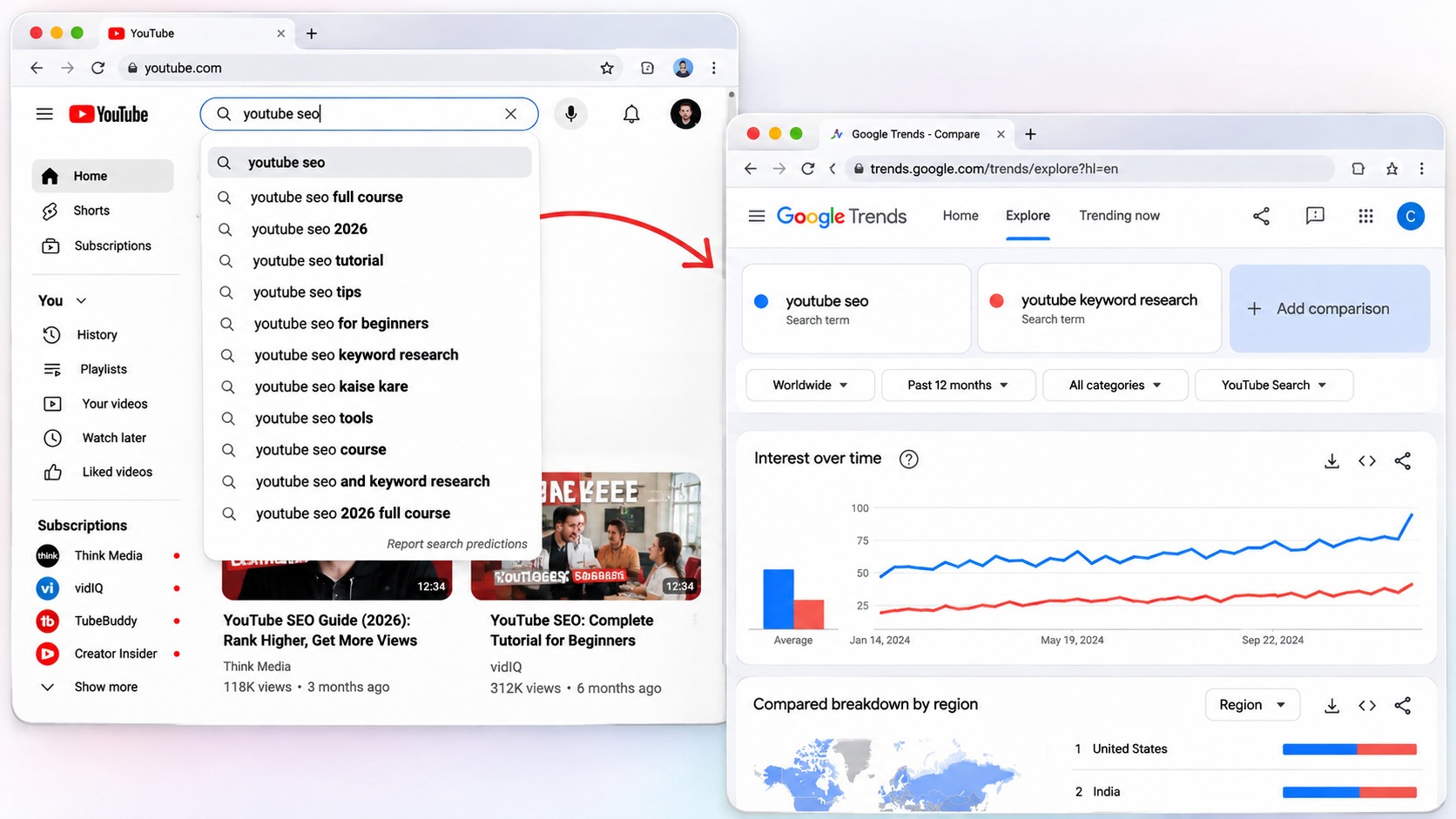
Keyword research tells you which topics have demand and how people phrase them.
A practical workflow:
-
Start with seed topics from your content pillars.
-
Use YouTube autocomplete. Type a seed phrase into the search bar and note suggestions.
-
Study top results. Look at titles, thumbnails, video length, age, comments and what viewers say is missing.
-
Check Google Search. Queries that return video results often benefit from a visual answer.
-
Use Google Trends to compare terms, see seasonality and spot rising topics.
-
Mine comments and "People also ask" for real questions.
-
Prioritize by relevance to your audience, demand, competition and your ability to create a better answer.
Group related keywords into clusters and series. A cluster on "YouTube thumbnails" might include design basics, mobile readability, common mistakes, testing and examples from your niche. Each video targets one primary question and links to the others through playlists, end screens and descriptions.
YouTube SEO: How to Optimize Videos for Search and Discovery
YouTube SEO means making a video easy for the platform and viewers to understand and choose. It never means stuffing keywords. Start from YouTube's guidance on uploading and video settings, then build the habits below into every upload.
How to Write SEO-Friendly YouTube Titles
-
Lead with the topic viewers recognize. Put the main phrase near the front when it reads naturally.
-
Promise a clear outcome. "How to Set Up Google Analytics 4 for a Small Business Website" beats "Analytics Tips."
-
Keep it readable. Long titles can truncate on mobile, so make the first words work alone.
-
Avoid clickbait. If the video doesn't deliver, viewers leave and trust drops. YouTube's spam, deceptive practices and scams policy addresses misleading metadata.
-
Test over time. Compare similar videos, or use YouTube's packaging tests where available.
The title and thumbnail work as a pair. The thumbnail provides the emotional or visual hook, and the title provides the clarifying promise. Don't repeat the same words in both.
How to Write YouTube Video Descriptions
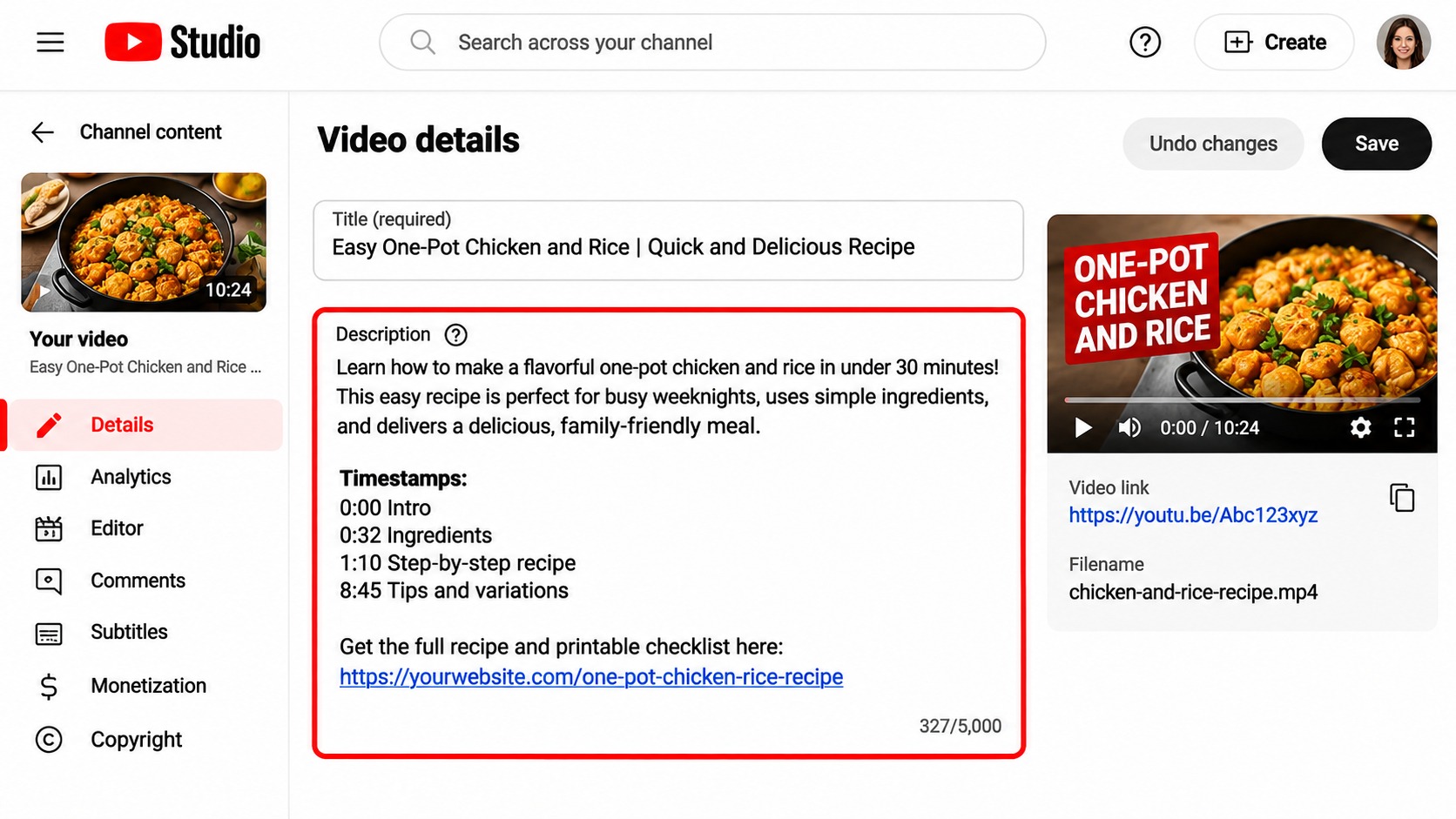
Descriptions help viewers decide whether to watch and give search systems context.
-
Front-load the first two lines. Summarize the value and include the main topic naturally, along with your most important link or call to action if relevant.
-
Add a short summary of what the video covers and who it's for.
-
Include timestamps for longer videos.
-
List resources mentioned in the video, plus related playlists or next videos.
-
Add links with context such as "Download the checklist" rather than bare URLs.
-
Skip keyword dumps. A paragraph of repeated terms helps no one and risks violating YouTube's metadata policy.
YouTube Tags: Do They Still Matter?
Tags are descriptive keywords added in video details. YouTube's help documentation explains that tags can be helpful when content is commonly misspelled, but that they play a minimal role in discovery compared with the title, thumbnail and description.
Use tags to capture common variations or misspellings, and keep them relevant. Don't treat them as a growth strategy. A tool like the YouTube Tag Generator can speed up brainstorming related terms for a video. Review the suggestions and keep only those that truthfully describe your content.
How to Choose the Right YouTube Category
Categories help classify content and can matter for some analytics comparisons and platform features. Choose the category that most accurately matches the video's primary purpose, not the one you think has less competition. Keep a consistent choice across similar videos unless the topic really differs.
Captions, Subtitles and Transcripts
Captions make videos accessible to deaf and hard-of-hearing viewers, to people watching without sound and to non-native speakers. YouTube explains how to add subtitles and captions, including uploading your own files and reviewing automatic captions.
-
Always proofread automatic captions, especially product names, jargon and accents.
-
Add translations for audiences you actively want to reach.
-
Keep a transcript on the page if you embed the video on your website. It gives readers and crawlers useful text.
Video Chapters and Timestamps
Chapters let viewers jump to the section they need. According to YouTube's guide to adding chapters, the first timestamp must start at 0:00, you need at least three timestamps in ascending order, and each chapter must be at least 10 seconds long. Use descriptive chapter names, since they double as an outline of the video. Chapters are especially helpful on tutorials, interviews and long explainers.
Playlists and Video Organization
Playlists organize videos into themes, series or learning paths, and they encourage continued viewing. Build them around viewer journeys ("Start here: YouTube SEO basics") rather than upload dates. Put the best entry-point video first, give each playlist a keyword-aware title and description, and feature the most important playlists on your channel homepage.
Thumbnails, Video Hooks and Viewer Retention
Packaging gets the click. The hook and structure earn the watch time.
How to Create Effective YouTube Thumbnails
YouTube's thumbnail guidance recommends a 16:9 image, with 1280×720 as the typical resolution, in common formats like JPG or PNG. Check the page for current file size limits. Design principles that tend to hold up:
-
One clear focal point. Avoid crowded layouts.
-
High contrast and strong hierarchy. The subject should stand out at small sizes.
-
Short text. Use three or four words at most, readable on a phone.
-
Expressive faces when a person is central to the video.
-
Consistent branding across the channel so returning viewers recognize you.
-
Honesty. The thumbnail must reflect what's in the video.
Competitor research helps. A tool such as the YouTube Thumbnail Downloader lets you save thumbnails from videos in your niche for side-by-side analysis. Use them for reference and pattern-spotting only, not to copy another creator's work.
How to Create a Strong Video Hook
The first 5–15 seconds should confirm the viewer clicked the right video.
-
Restate the promise quickly.
-
State the problem or stakes, such as why this matters now.
-
Preview the payoff without giving everything away.
-
Skip long intros. Move logos, extended greetings and channel plugs later.
Example for a tutorial: "If your videos get impressions but no clicks, your thumbnail and title are probably not matching what viewers want. In the next eight minutes, I'll show you three fixes and test them on a real channel."
How to Improve Audience Retention
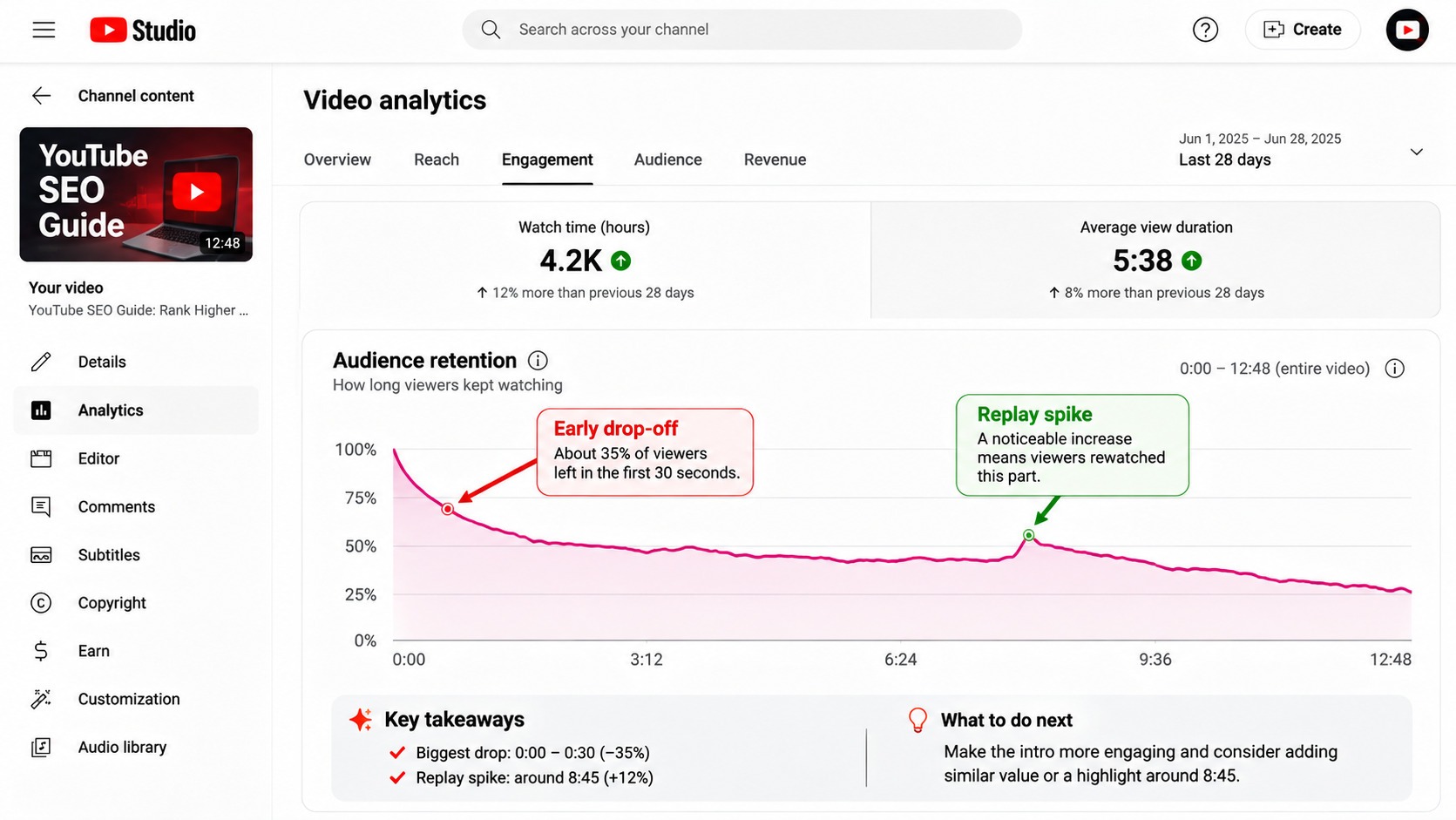
Retention measures how much of a video people watch and where they drop off. Use YouTube's audience retention report to look for steep early drops, which signal a weak hook or mismatch with the title. Also look for mid-video dips, which often mean slow sections or off-topic tangents, and for spikes or replays, which show moments viewers valued.
Then improve structure:
-
Cut filler and repeated points.
-
Use pattern interrupts such as visuals, b-roll, graphics or a change in pace.
-
Open loops ("in a moment I'll show the mistake most people make").
-
Match length to the topic. A video should be as long as it needs to be.
Compare retention across several videos before changing your whole approach.
How to Create a Sustainable YouTube Content Strategy
Consistency beats intensity. Build a system you can keep up.
-
Mix content types. Combine evergreen search videos, series, trend responses and product or brand content.
-
Use pillars and clusters so videos reinforce each other.
-
Batch production. Script, film and edit in blocks.
-
Keep a content calendar with topic, keyword, funnel stage, publish date and call to action.
-
Review quarterly. Retire formats that fail and double down on what works.
A simple 90-day structure:
-
Days 1–30: audit your channel, research keywords and publish 4–6 foundation videos plus an intro playlist.
-
Days 31–60: build a series, test two title/thumbnail approaches, add Shorts that tease long-form videos.
-
Days 61–90: analyze performance, update underperforming metadata, expand winning topics and publish a case study or product-led video.
There's no universal ideal upload frequency. Choose a pace based on production capacity, topic depth and your goals. One excellent video every two weeks usually beats four rushed videos you can't sustain.
Types of YouTube Videos That Work for Marketing
Choose formats based on funnel stage and capacity. A solo creator might favor tutorials and Shorts, while a B2B team might lean on demos, webinars and customer stories.
YouTube Shorts vs. Long-Form Videos: Which Should You Use?
Use both if you can, but give each a distinct job.
Check YouTube's Shorts documentation for current length limits and upload requirements, as these have changed. YouTube also updated how Shorts views are counted in 2025, so confirm the current definition before comparing Shorts and long-form view numbers.
Shorts viewers don't automatically become long-form viewers. Different people use the Shorts feed differently. To bridge the gap, use Shorts to tease a specific long-form topic, link related videos and watch your own analytics to see whether Shorts viewers return to long-form content. For revenue expectations, see how much YouTube Shorts pays for 1,000 views.
Create Audience-Centered YouTube Content
Brand-first content talks about what you want to say. Audience-first content answers what viewers want to know.
-
Listen first. Read comments, support requests and community posts.
-
Name the viewer's problem early.
-
Teach before you pitch. Earn trust, then recommend.
-
Be specific. Real examples, screens and results outperform vague advice.
-
Be authentic. Don't oversell or fake expertise.
A reliable video structure:
-
Hook: the promise and stakes.
-
Problem or context: why it matters.
-
Main content: the steps, argument or story.
-
Examples: proof that it works.
-
Summary: the key takeaways.
-
CTA: one relevant next step, such as watching a related video, downloading a resource or subscribing.
How to Promote YouTube Videos Beyond YouTube
Publishing is step one. Strong channels bring their own audience to new videos.
-
Blog and website: embed videos in relevant articles and landing pages, with supporting text.
-
Email: send new videos to subscribers with a short note on why it's worth watching.
-
Instagram, TikTok, Facebook, LinkedIn: adapt rather than repost. Cut vertical clips, write native captions and tailor the angle to each platform.
-
Reddit and forums: share only where self-promotion is allowed, and add real value to the discussion.
-
Podcasts and newsletters: mention videos where the audience overlaps.
-
Collaborations and communities: share useful videos with relevant groups and partners.
Paid distribution is a separate decision. Some creators look at options like buying YouTube shares to support sharing activity, but read the policy discussion in the social proof section before deciding. Share activity from real viewers who find the video useful will always be more valuable than numbers alone.
YouTube Video SEO and Google Search: How to Get Videos Discovered on Google
While YouTube SEO focuses on optimizing your packaging and metadata to rank within YouTube’s native search and recommendation systems, Google Video SEO ensures your video content is discoverable and indexable in broader Google Web Search results.
| YouTube SEO | Google Video SEO | |
|---|---|---|
| Where the video appears | YouTube Search, Home, Suggested videos, Shorts feed | Google Search results, including video results and video previews on web pages |
| What is being optimized | The video on YouTube | The web page where the video is embedded (or the YouTube watch page) |
| Main goal | Be chosen and watched by the right viewers on YouTube | Be crawled, indexed and shown for relevant Google queries |
| Key levers | Title, thumbnail, description, captions, chapters, playlists, retention and viewer satisfaction | Crawlable and indexable page, video as a main element of the page, supporting text, thumbnail access, structured data, video sitemap |
| Technical markup | Handled inside YouTube Studio | VideoObject structured data and an optional video sitemap that you add to your own site |
| How you check results | YouTube Analytics: impressions, CTR, traffic sources, retention | Google Search Console: video indexing report, Performance report, URL Inspection |
| Who controls the page | YouTube hosts it, and you control metadata | You control the page, hosting and markup |
| Guarantee of appearing | None, since YouTube doesn't publish a ranking formula | None, since Google's video SEO guidelines explain eligibility, not guaranteed placement |
| Typical mistake | Keyword-stuffed or misleading metadata | Embedding a video on a thin page, or blocking the page from crawling or indexing |
A video hosted on YouTube isn't automatically guaranteed to appear as a Google video result; Google decides what to show based on query relevance, page context, and technical implementation.
How to Optimize Web Pages Containing YouTube Videos
-
Make the video a primary element: Place the embedded video prominently near the top of the page rather than burying it below the fold or behind tabs.
-
Provide supporting context: Include transcripts, key summaries, or structured outlines alongside the embed so crawlers have plenty of contextual text.
-
Ensure crawlability: Verify that your page isn't blocked by robots.txt rules, noindex tags, or login walls.
VideoObject Structured Data (JSON-LD)
VideoObject structured data is machine-readable markup that helps Google understand your video's details (such as name, description, upload date, and duration) and makes your pages eligible for enhanced video search features. Always validate your markup using Google's Rich Results Test.Video Sitemaps and Search Console
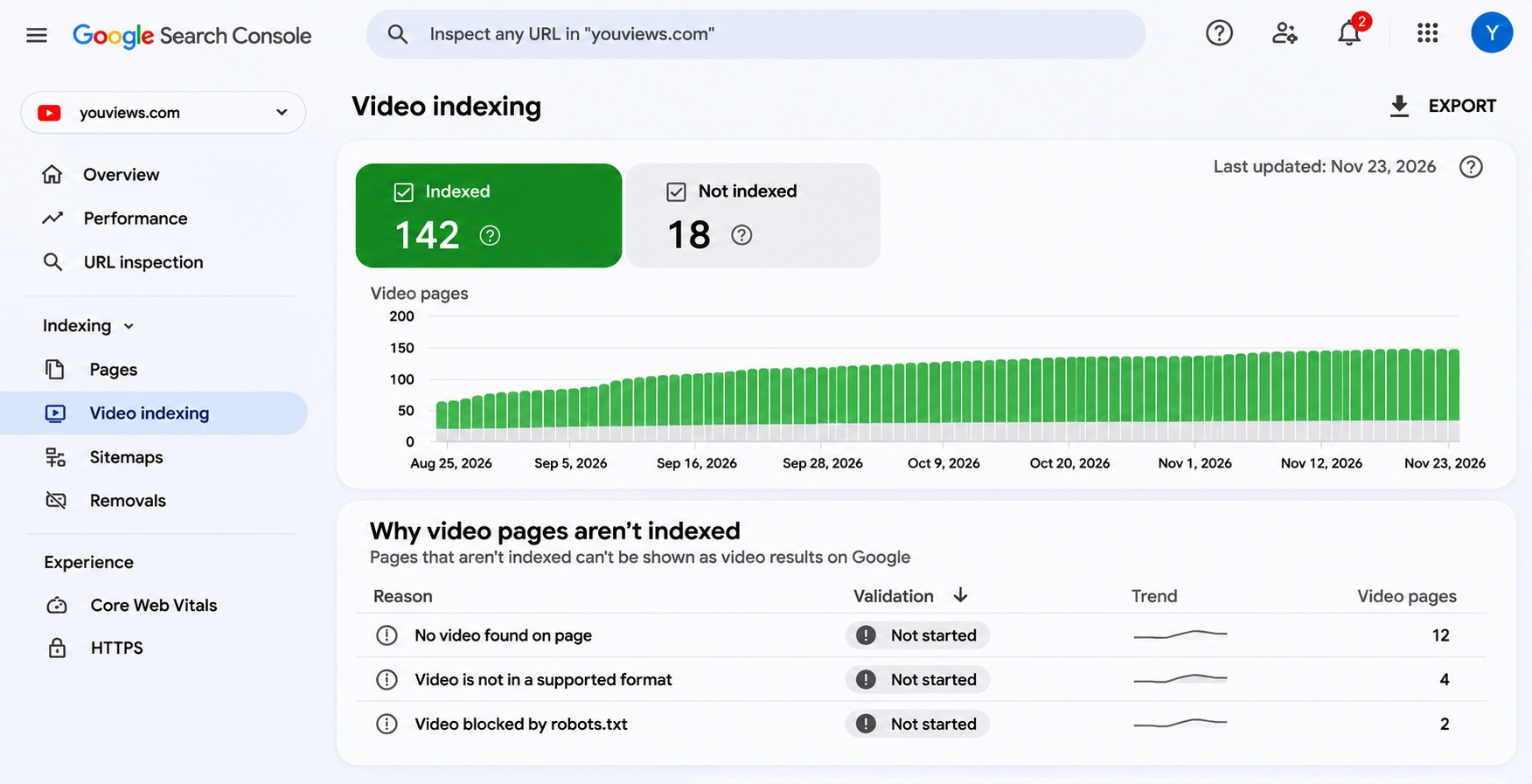
Submitting a video sitemap gives Google extra hints about your video locations and metadata. Use the Video indexing report in Google Search Console regularly to monitor which video pages are successfully indexed and troubleshoot any crawling issues.
Monitoring Video Visibility in Google Search
Google Search Console is the main tool for checking how your site performs in Google. For video pages:
-
Use the video indexing report to see which pages with videos Google has indexed, and why others weren't. Common reasons include the video not being a main element on the page, or the page not being indexed. Check Google's documentation for the current list of issues.
-
Use the URL Inspection tool to test specific pages.
-
Use the Performance report and filter by search appearance, where available, to review clicks and impressions for video results.
-
Check structured data and sitemap reports for errors.
A practical rhythm is to review Search Console monthly, and after any significant site change, to catch indexing issues early.
How to Use YouTube Analytics to Improve Your Marketing Strategy
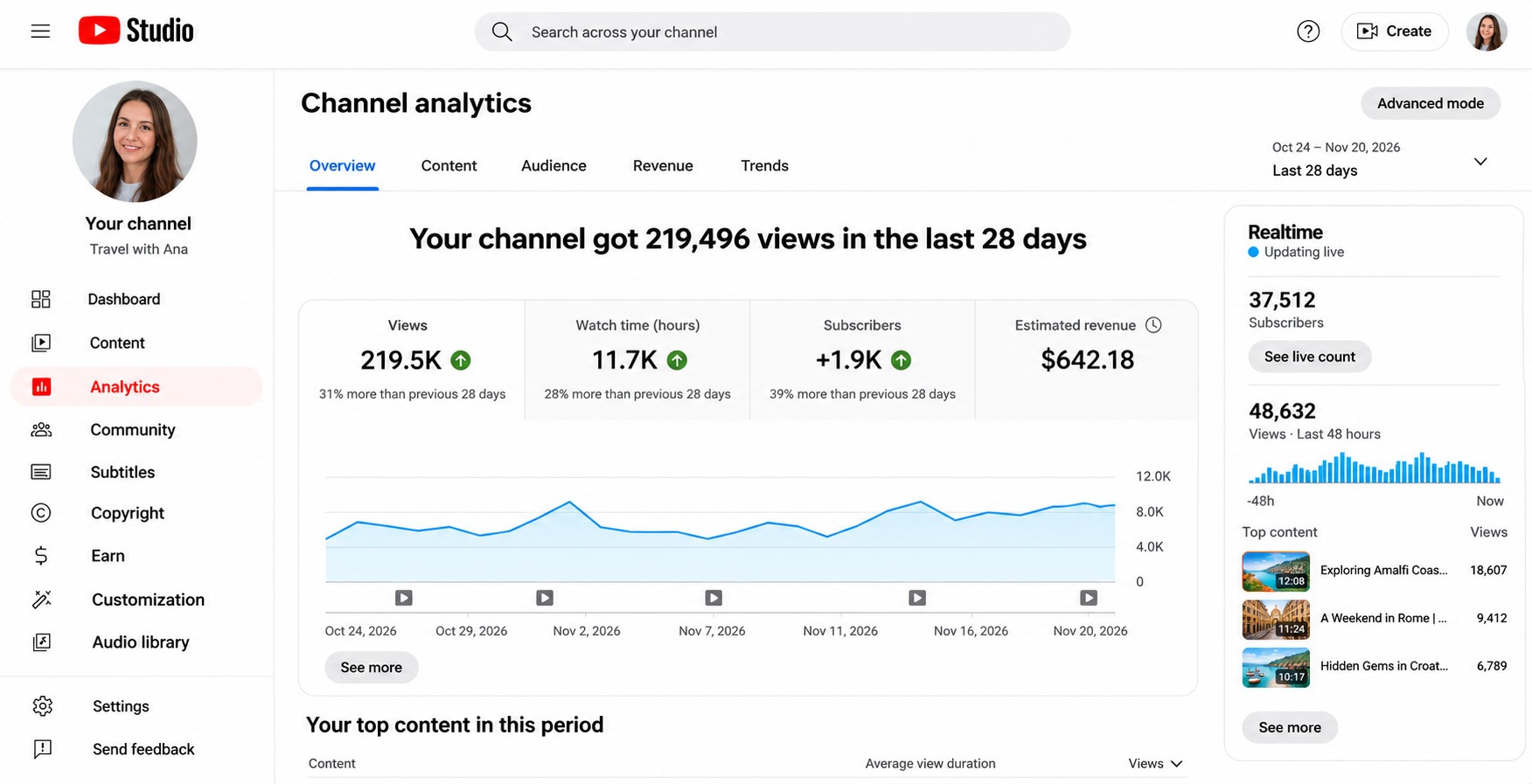
Analytics shows what's working and what to test next. Open YouTube Studio and use the Analytics tab, which YouTube explains in its analytics help documentation.
Metrics must be read together.
| YouTube Studio | Most likely issue | What to check | What to test next |
|---|---|---|---|
| Low impressions on new videos | Topic isn't being surfaced, or demand is low | Traffic sources, keyword research, whether the topic fits your channel's established audience | Choose topics with proven search demand, add the video to a relevant playlist, promote it externally |
| Healthy impressions, low CTR | Packaging doesn't earn the click | Compare thumbnails and titles against your own best-performing videos and top competitors | Redesign the thumbnail, rewrite the title for clarity, test one change at a time |
| Good CTR, steep drop in the first 30 seconds | Hook doesn't match the promise | The audience retention report, the first 10 seconds of the video | Restate the promise immediately, shorten the intro, preview the payoff |
| Retention dips mid-video | Pacing or off-topic sections | Where the dips occur, and what's on screen at that moment | Cut filler, add visual changes, reorder sections, use chapters |
| Good retention, few subscribers gained | Weak call to action or unclear channel value | Which videos convert, and the channel homepage and trailer | Add a specific reason to subscribe, link to a series playlist, clarify channel positioning |
| Views spike then flatten quickly | Trend traffic or one-off promotion | Traffic source breakdown and returning viewers | Follow up with evergreen content on the same topic, link the next video in the series |
| High Shorts views, little long-form growth | Different audiences with different intent | Subscribers gained from Shorts versus long-form, and traffic to long-form videos | Tease specific long-form topics in Shorts, and link related videos |
| Strong external traffic, weak retention | Visitors arrive from a source with mismatched expectations | Traffic source detail, and the page or post linking to the video | Rewrite the promotion's description to set accurate expectations |
| Views rise but conversions don't | Offer or landing page mismatch | UTM-tracked clicks, landing page message, CTA placement | Align the landing page to the video's promise and move the CTA to the moment of highest interest |
A high CTR with poor retention suggests a packaging promise the video doesn't fulfill. A low CTR with excellent retention suggests the video is good but the title or thumbnail needs work. Also check whether views come from your own activity: see whether YouTube counts your own views to understand how views are validated.
A practical routine:
-
Weekly: review new video performance (first 48 hours and first week), CTR, retention and comments.
-
Monthly: compare the best and worst videos, review traffic sources, update titles or thumbnails on underperformers, and plan the next batch.
-
Quarterly: audit pillars, retire weak formats and set new goals.
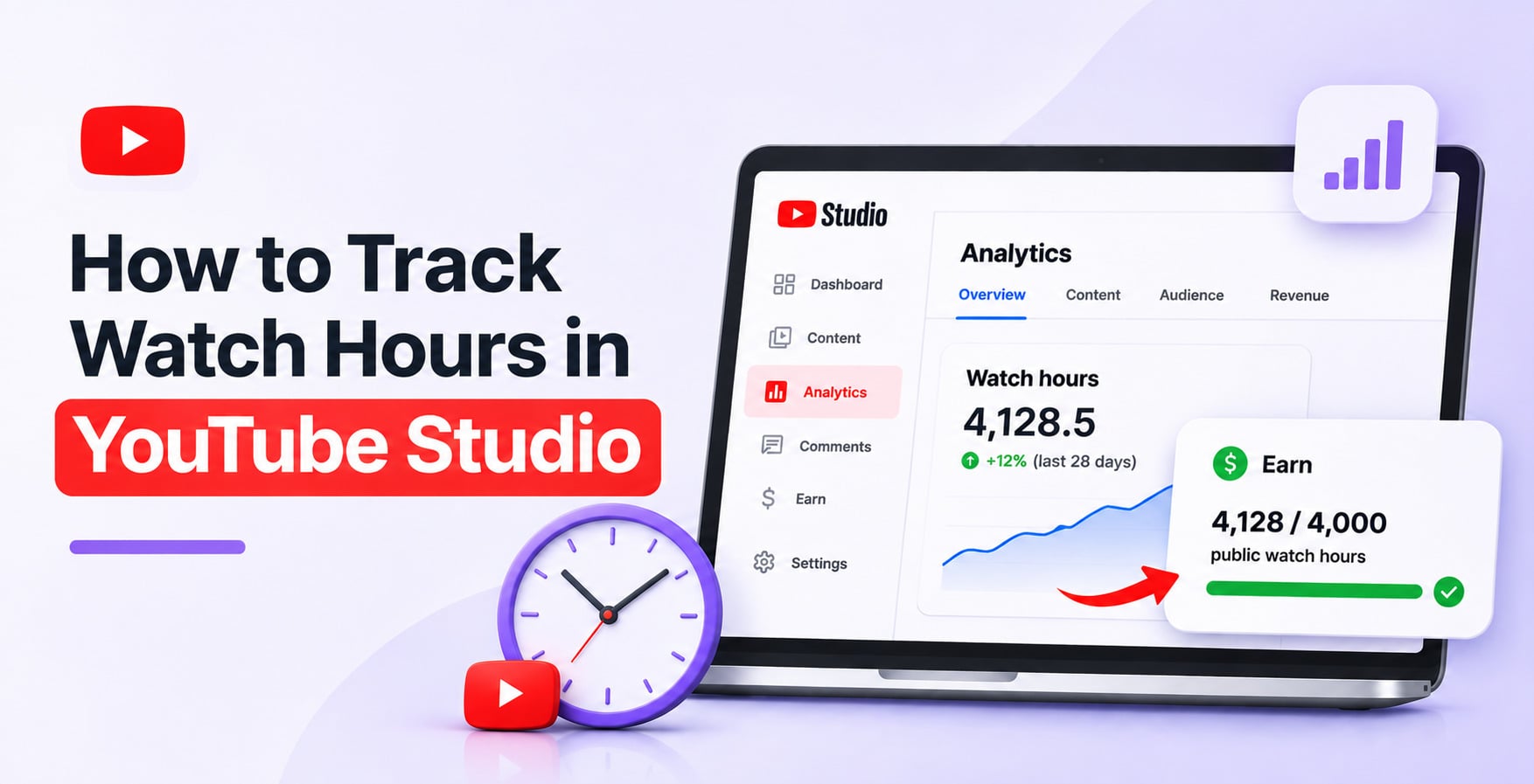
For ongoing tracking, the YouTube Subscriber Count tool is a quick way to monitor your own or a competitor's public subscriber numbers. Pair it with YouTube Studio for depth. If you're working toward monetization, tracking watch hours in YouTube Studio shows where to find your progress.
For conversions, add UTM parameters to links in descriptions and pinned comments. Google explains how to build campaign URLs for Google Analytics.
How to Build Engagement and a YouTube Community
Engagement is a signal that real people care about your content, not a ranking trick. Don't assume likes or comments alone will boost visibility.
-
Ask specific questions instead of "let me know in the comments."
-
Reply early and often. Early replies encourage more conversation.
-
Use Community posts for polls, behind-the-scenes updates and previews.
-
Go live when you have something worth discussing.
-
Moderate thoughtfully. Use filters, hold-for-review and blocked words where needed. Understand what a highlighted comment means so you can use features like pinning and hearts to shape the conversation.
-
Keep comments on where your audience benefits from discussion. If they're off by mistake, here's how to turn on comments on YouTube.
-
Run clean giveaways. The YouTube Comment Picker can select random winners from comments. Always follow YouTube's contest policies and local rules.
-
Encourage likes naturally by making videos worth liking. For practical ideas, see how to get more likes on YouTube.
How to Grow Your YouTube Channel
Sustainable growth rarely comes from one viral video. It comes from repeating a loop: research, publish, measure, improve.
-
Target a specific audience with a clear promise.
-
Build search-based videos that answer real questions and keep working over time.
-
Improve CTR and retention using analytics. These two levers affect nearly every other growth tactic.
-
Create series and playlists so one view leads to another.
-
Use Shorts to reach new viewers and point to deeper videos.
-
Engage the community and use comments for new topic ideas.
-
Collaborate and cross-promote with relevant creators and brands.
-
Test deliberately. Change one variable at a time and track results.
For deeper dives, see how influencers grow on YouTube for audience development patterns, and why your YouTube views may not be increasing if growth has stalled.
Subscribers matter most when they represent people who want to watch again. If you want to support the visible momentum of a young channel, YouTube subscriber services exist, but they work best alongside the content and optimization steps above and carry policy considerations covered below.
Collaborations, Influencer Marketing and Audience Expansion
Collaborations put your content in front of audiences that already trust someone else.
Formats: guest appearances, interviews, co-created videos, challenges, sponsored placements, and shout-outs.
Choosing partners:
-
Audience fit: do they serve the same people you want to reach, without being a direct duplicate?
-
Engagement quality: look at comments and retention signals, not just subscriber counts.
-
Content quality and values: check that their tone and standards match yours.
-
Size balance: partners of similar scale often yield fair exchanges.
-
Disclosure: paid or sponsored content must be disclosed according to YouTube's paid promotion rules and local advertising regulations.
Define the goal first, whether it's new subscribers, traffic or sales, and track it with unique links or codes.
YouTube Advertising: Using Paid Promotion to Reach Your Audience
Paid ads on YouTube are bought through Google Ads, and they can complement organic work, especially for launches, offers and reaching specific audiences. See YouTube Ads and Google Ads' video campaign documentation for current formats, since these change often.
-
Goals: awareness, consideration (views and engagement) and conversions.
-
Targeting: audiences by demographics, interests, custom segments and remarketing lists.
-
Creative: open strongly in the first seconds, since many formats allow skipping, and match the message to the audience's stage.
-
Budget and testing: start small, test several creatives and let data decide.
-
Measurement: track view rate, cost per view and conversions with Google Ads and Analytics.
Organic and paid are different. Organic content earns attention over time. Ads buy attention immediately and stop when the budget does. Using ads to promote videos that already perform well organically is usually more efficient than promoting an untested one.
Evergreen vs. Trend-Based YouTube Content
The best strategies are weighted toward evergreen content as a foundation, with trends used selectively when they fit your audience and expertise.
Balancing both ensures your channel captures active, long-term search demand while occasionally capitalizing on viral interest.
Establishing this steady equilibrium protects your channel's authority and keeps your core subscriber base consistently engaged.
Update older videos by refreshing titles, descriptions, pinned comments and thumbnails, or re-record when information changes. Don't chase every trend. It may attract viewers who have no interest in your channel's core topic and distort your analytics.
YouTube Monetization, Earnings and ROI
YouTube marketing generates value in several ways:
-
Platform revenue: ads, memberships, Super Chat and other features available to eligible channels.
-
Affiliate marketing: commissions on recommended products.
-
Sponsorships and brand deals.
-
Your own products and services.
-
Lead generation and ecommerce driven by videos.
Partner Program eligibility
Always confirm current rules on YouTube's Partner Program page, since thresholds have changed before. At the time of writing, YouTube offers two tiers:
-
Early access (fan funding features): 500 subscribers, 3 public uploads in the last 90 days, and either 3,000 public watch hours in the last 12
months or 3 million valid public Shorts views in the last 90 days.
-
Full ad-revenue sharing: 1,000 subscribers, plus either 4,000 valid public watch hours in the last 12 months or 10 million valid public Shorts views in the last 90 days.
Beyond the numbers, channels also need to follow the monetization policies, have no active Community Guidelines strikes, enable 2-step verification, live in a supported region and link an AdSense account. Applications are reviewed by YouTube. Thresholds, regional availability and feature access can change, so check the page before you plan around any number.
Three points are often confused:
-
Eligibility requirements are the subscriber, watch-time and policy conditions for joining the program.
-
Monetization features (ads, memberships, shopping and others) unlock depending on the tier and region.
-
Valid public watch hours and views only count when they come from legitimate, public viewing. Time on private videos, and on unlisted videos, doesn't count. For the details, see what counts as valid public watch hours.
For creators working toward the watch-time requirement, YouTube watch hours services are sometimes considered. Be clear-eyed about this. YouTube only counts valid public watch time, it reviews channels before admitting them, and its fake engagement policy applies to artificial watch time.
Realistic earnings
Revenue varies widely by niche, audience location, video length, season, advertiser demand and format. Shorts and long-form pay differently. Treat any figure you see online as a range, not a promise.
To get a rough estimate for planning, the YouTube Money Calculator can model earnings from views and an assumed RPM. Replace the assumptions with your own YouTube Analytics figures as soon as you have them.
Measuring ROI
For most businesses, ad revenue is the smallest part of the return. Build measurement in from the start:
-
UTM links on every description and pinned-comment link so traffic is attributable in Google Analytics.
-
Dedicated landing pages for video audiences, with a message that matches the video's promise.
-
Conversion tracking for sign-ups, purchases, demo requests or downloads.
-
Discount codes where offline or untracked purchases are likely.
-
Lead quality tracking, since video leads may close slower, but better, than leads from other channels.
-
Attribution awareness. YouTube often influences a decision early, and the conversion is credited to another channel later. Ask "how did you hear about us?" and look at assisted conversions, not just last-click.
A simple ROI formula: (Revenue attributed to YouTube − total cost of production, promotion and time) ÷ total cost. Include your team's time in the cost, or the results will flatter the channel.
Common YouTube Marketing Mistakes to Avoid
1. Publishing without a strategy.
Why it happens: The pressure to post regularly outweighs planning. Why it matters: Random videos don't build a recognizable topic or audience. How to avoid it: Set one primary goal and 3–5 content pillars before filming.
2. Skipping audience and keyword research.
Why it happens: Creators choose topics they find interesting. Why it matters: A great video on a topic nobody searches for or wants stays unseen. How to avoid it: Validate each idea against search demand, comments and competitor gaps.
3. Weak titles and thumbnails.
Why it happens: Packaging is treated as an afterthought. Why it matters: Impressions don't become views. How to avoid it: Design the title and thumbnail before or during scripting, and review CTR afterward.
4. Misleading clickbait.
Why it happens: Short-term CTR feels like success. Why it matters: Viewers leave, retention drops, trust erodes and metadata policies may apply. How to avoid it: Make a promise the video actually keeps.
5. Long, unfocused intros.
Why it happens: Habit and brand-centered thinking. Why it matters: Early drop-off is hard to recover from. How to avoid it: Open with the promise and move branding later.
6. Ignoring retention and analytics.
Why it happens: Dashboards feel overwhelming. Why it matters: You repeat the same mistakes. How to avoid it: Use the weekly and monthly routine above and change one thing at a time.
7. Focusing only on subscriber counts.
Why it happens: It's the most visible metric. Why it matters: Subscribers who don't watch don't produce results. How to avoid it: Track returning viewers, watch time and conversions too.
8. Overly promotional content.
Why it happens: The business wants direct sales. Why it matters: Viewers come for value, not ads. How to avoid it: Follow a roughly "teach first, pitch second" balance and keep CTAs relevant.
9. Neglecting community and comments.
Why it happens: Time constraints. Why it matters: Comments reveal topic ideas, and replies build loyalty. How to avoid it: Block out regular time to engage.
10. Poor distribution.
Why it happens: Creators assume YouTube will do the promoting. Why it matters: New channels have no built-in audience. How to avoid it: Plan promotion for every upload.
11. Skipping captions and accessibility.
Why it happens: It feels optional. Why it matters: You lose viewers who watch silently or need accessibility support. How to avoid it: Review captions as part of your publishing checklist.
12. Ignoring technical video SEO and Google opportunities.
Why it happens: YouTube SEO and Google video SEO are conflated. Why it matters: Videos on your own site may never be indexed as video results. How to avoid it: Use the website checks and Search Console steps above.
13. Relying only on trends.
Why it happens: Trends offer quick spikes. Why it matters: The audience that arrives often doesn't stay. How to avoid it: Keep trend content as a minority of the schedule.
14. Violating platform policies.
Why it happens: Rules are skimmed or misunderstood. Why it matters: Strikes, demonetization and removals can undo months of work. How to avoid it: Review the Community Guidelines, copyright basics and the fake engagement policy before publishing and promoting.
Best YouTube Marketing Tools to Grow Your Channel
The right YouTube marketing tools can help you research video topics, optimize content, track performance and promote your channel more efficiently. You don't need a complicated tool stack to get started. A combination of free YouTube tools and a few specialized resources can cover most of your marketing needs.
|
Tool |
Best for |
How it helps |
|---|---|---|
|
YouTube Studio |
Video publishing and analytics |
Uploads videos, edits metadata, manages comments, tracks performance and monitors monetization. |
|
Google Search Console |
Google video visibility |
Monitors website performance in Google Search and helps identify indexing and video search issues. |
|
Google Trends |
Video topic research |
Compares search interest, identifies seasonal trends and helps uncover popular topics. |
|
Paid YouTube promotion |
Creates, targets and measures video advertising campaigns. |
|
|
Video structured data |
Checks supported structured data on pages, including relevant VideoObject markup. |
|
|
Campaign tracking |
Creates UTM-tagged URLs to measure traffic from video descriptions and other promotional placements. |
|
|
Semrush |
Keyword research and competitive analysis
|
Helps marketers research keywords, analyze competitors, identify content opportunities and plan content around search demand. |
How to Choose the Right YouTube Marketing Tools
Start with free tools that provide reliable data about your channel. YouTube Studio is essential for tracking performance, while Google Search Console and Google Trends can help you understand search visibility and audience interest.
Add specialized YouTube marketing tools when you need to solve a specific problem. A thumbnail downloader can help you research competitors' visuals, a tag generator can provide metadata ideas, and a comment picker can simplify giveaway management.
Use estimates and public metrics as benchmarks rather than definitive performance indicators. Your own YouTube Analytics data remains the most reliable source for evaluating your channel's performance.
How YouViews Can Help You Grow on YouTube: A Small Case Study
Theory is useful, but it helps to see how the pieces fit together. The scenario below shows how a creator might combine free tools, optimization work and, optionally, growth services in an eight-week plan, and what to measure so you can judge whether any of it worked.
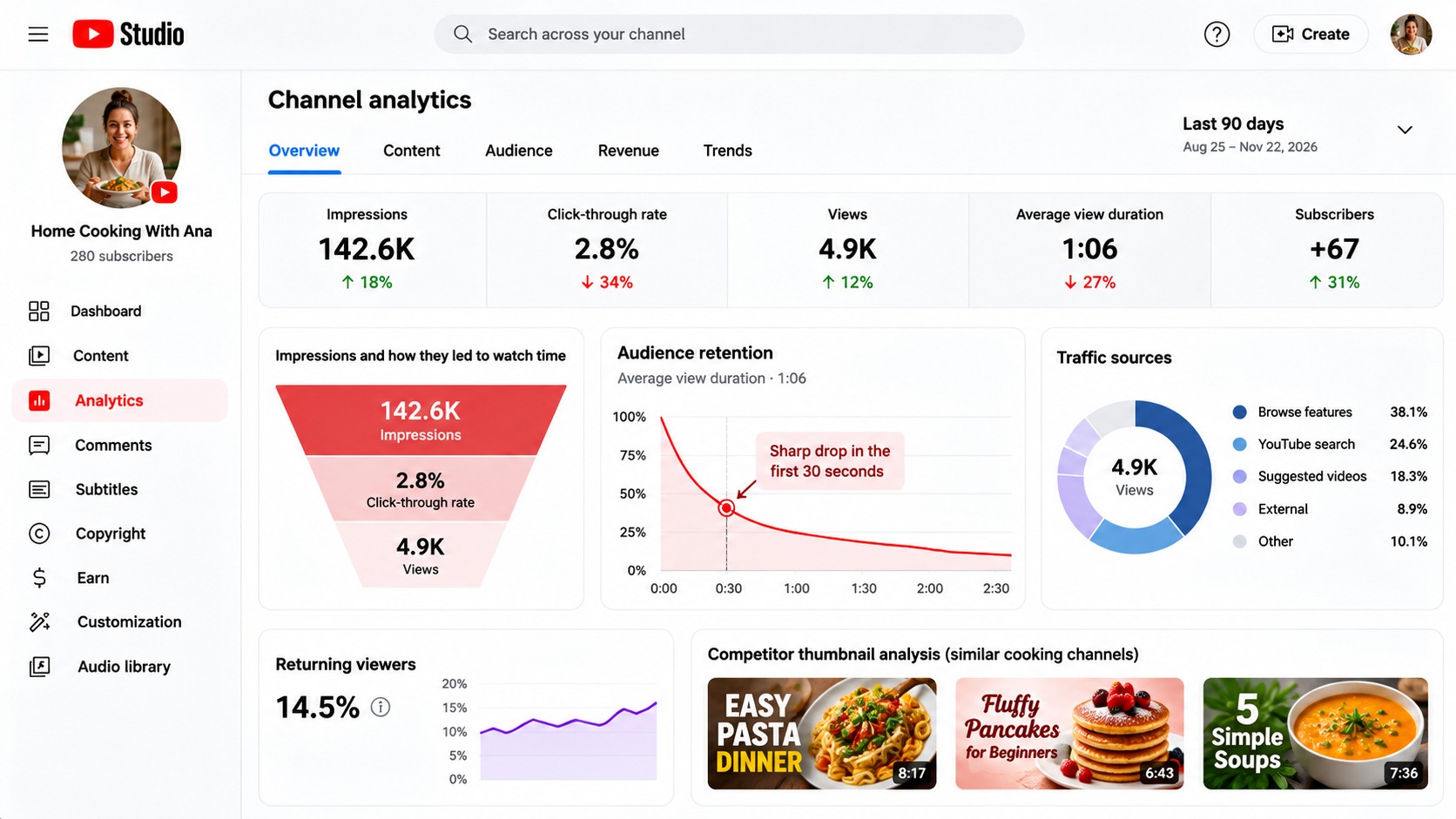
A small home-cooking channel has 20 published videos, fewer than 300 subscribers and limited views. The creator wants to launch a beginner-recipe series and work toward YouTube Partner Program eligibility over the next year. Here is how an eight-week strategy could look.
Step 1: Diagnose before spending anything (Weeks 1–2)
-
Review CTR, average view duration, traffic sources and returning viewers in YouTube Studio for the last 90 days.
-
Use the YouTube Subscriber Count tool to benchmark subscriber numbers against similar channels.
-
Study competitor thumbnails using the YouTube Thumbnail Downloader, noting layouts, text and visual patterns without copying them.
Finding: Impressions are reasonable, but CTR is low and retention drops sharply in the first 30 seconds, suggesting the creator should focus on improving titles, thumbnails and hooks.
Step 2: Fix the fundamentals (Weeks 2–4)
-
Rewrite titles around specific search queries, such as "How to Cook Rice Perfectly on the Stove for Beginners."
-
Redesign thumbnails with one focal point and three or four words.
-
Tighten intros to deliver on the video promise within the first 10 seconds.
-
Add chapters and proofread captions.
-
Use the YouTube Tag Generator to brainstorm relevant keyword variations, keeping only accurate tags.
-
Organize the series into a playlist with a clear entry-point video.
Step 3: Launch and promote (Weeks 4–6)
-
Share videos through email, relevant blog posts with embedded videos and short clips on other platforms.
-
Encourage comments and respond to viewers to build community.
-
Use highlighted comments to direct viewers toward useful discussions or related content.
-
Optional promotion: Consider supplementary services such as YouTube views or likes.
Frequently Asked Questions
What is YouTube marketing?
YouTube marketing is the use of YouTube videos, Shorts, livestreams and ads to reach an audience and achieve goals such as awareness, subscribers, leads, sales or revenue. It includes organic content and paid advertising.
How do you create a YouTube marketing strategy?
Define a measurable goal, identify your audience and their questions, choose 3–5 content pillars, research keywords and competitors, plan a sustainable publishing cadence, and set the metrics you'll review. Then test and refine using YouTube Analytics.
How can beginners start YouTube marketing?
Create and brand your channel, pick one niche audience, publish a small set of search-based videos that answer clear questions, optimize titles, thumbnails, descriptions and captions, and review analytics after each upload. Start with a pace you can maintain.
Is YouTube good for marketing a business?
Yes, for many businesses. It supports product education, trust and search discovery, and videos stay useful long after publishing. It requires consistent production effort, so it works best when tied to clear business goals and tracked with UTMs and conversions.
How does YouTube SEO work?
YouTube SEO helps YouTube and viewers understand what a video is about and whether it's right for them. It involves clear titles, descriptions, thumbnails, captions, chapters and playlists, matched to real search intent. YouTube doesn't publish a ranking formula, so viewer satisfaction signals like click-through and retention are the practical focus.
How often should you upload YouTube videos?
There's no universal ideal. Choose a schedule based on your resources, your format and the quality you can maintain. Consistency over months matters more than a short burst of daily uploads.
How do you promote YouTube videos?
Optimize metadata for search, share to relevant communities and social platforms, embed videos in blog posts and landing pages, send them to your email list, collaborate with other creators and consider paid ads. Adapt the message for each channel.
How much does YouTube marketing cost?
Organic marketing can start with a smartphone and free tools, but quality production, editing, thumbnails and your time are real costs. Paid ads have their own budgets, which you set in Google Ads. Total cost depends on your production level and strategy.
How do you measure YouTube marketing success?
Match metrics to goals: impressions, CTR, views, average view duration and retention for content performance; subscribers and returning viewers for audience growth; and UTM-tracked clicks, leads and sales for business results. Review weekly and monthly in YouTube Studio and your analytics platform.
Can YouTube videos rank on Google?
Yes. Google can show videos in search results, but a YouTube upload isn't guaranteed to appear. Google's video SEO guidelines recommend indexable pages where the video is a main element, good metadata, optional structured data and a video sitemap where useful. Check the video indexing report in Search Console.