


YouTube channel keywords describe a channel's overall topics and niche in YouTube Studio. While they provide context, they do not guarantee higher rankings, help you increase YouTube views, or serve as a main discovery signal. Understanding how they work and where to set them can help you optimize your channel strategy effectively.
What Are YouTube Channel Keywords?
YouTube channel keywords are short descriptive terms that summarize a channel's overall subject matter.
They are stored at the channel level and are meant to represent the recurring themes of a creator's content, not the subject of one individual upload.
YouTube offers this field so creators can describe their channel in their own words. YouTube may use the information as contextual metadata alongside other signals, such as video titles, descriptions, and audience behavior.
The keywords are not displayed prominently to viewers, so their job is purely to describe, not to persuade.
Channel Keywords vs. Video Tags
Channel keywords describe an entire channel, while video tags describe a single video. The two settings live in different places in YouTube Studio and serve different purposes.
-
Channel keywords cover the channel's overall niche and the topics it returns to repeatedly.
-
Video tags identify or clarify a specific video. According to YouTube Help, tags play a minimal role in discovery in most cases and are mainly useful when a video's subject is commonly misspelled.
-
Video titles and descriptions communicate what an individual video is about to both viewers and YouTube's systems, and they matter far more than tags for helping people find a video.
Neither setting should be treated as a ranking lever. Channel keywords provide broad context; video tags provide narrow clarification. Both sit well behind content quality, titles, and descriptions in importance.
Do Channel Keywords Still Matter?
Channel keywords are still available in YouTube Studio and are worth setting correctly, but they should be treated as a supporting metadata element rather than a growth strategy. YouTube does not publish a ranking weight for the field, and there is no reliable evidence that adding keywords directly improves recommendations.
What consistently drives discovery on YouTube is a different set of factors:
-
Content that matches viewer intent. Videos that answer the questions people are actually searching for or address interests they already have.
-
Clear titles and descriptions. These are read by viewers and by YouTube's systems, and they shape whether someone clicks.
-
A consistent content focus. Channels that cover a recognizable set of topics are easier for YouTube to connect with the right audience.
-
Viewer satisfaction and retention. Watch time, engagement, and survey responses carry far more weight than any metadata field.
-
Performance data. YouTube Analytics shows which topics resonate, which is more actionable than guessing at keywords.
Channel keywords can still be a useful way to state your niche plainly, and there is no downside to filling the field accurately. Their independent effect on discovery is simply hard to measure.
Key takeaway: Set relevant channel keywords, but do not expect them to compensate for weak content, unclear positioning, or a mismatch between your videos and your audience. A well-optimized channel helps build initial momentum, but delivering engaging content remains essential if you want to get more likes on YouTube video uploads over time.
Where to Find Channel Keywords in YouTube Studio
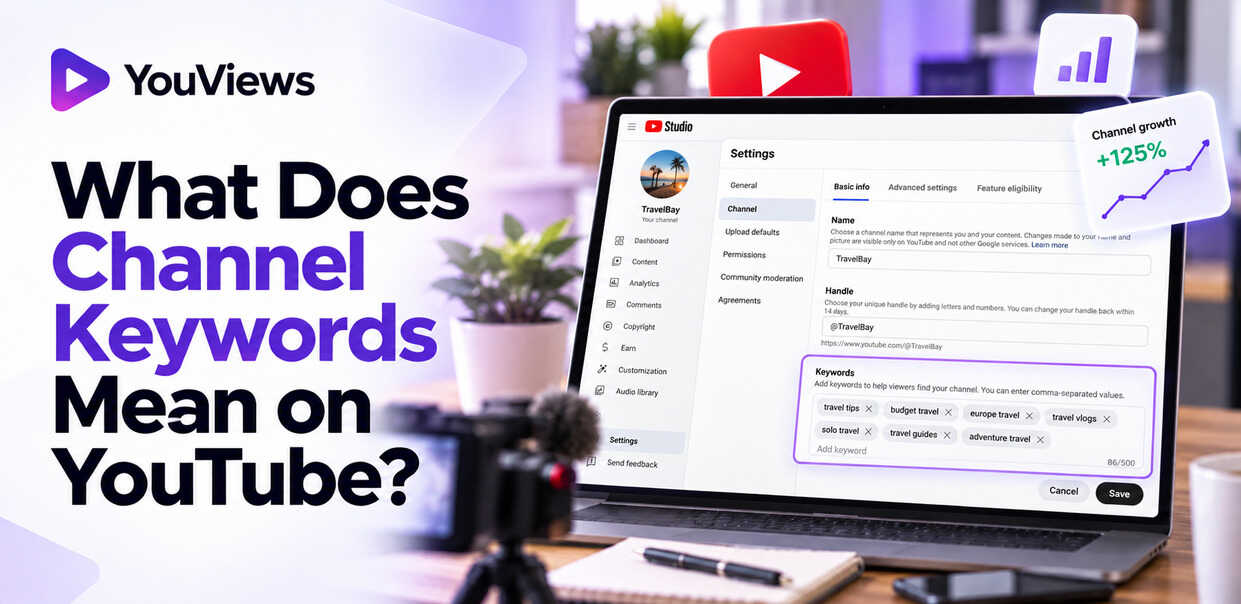
The channel keywords field is located in the channel settings in YouTube Studio, not in the upload or video details screen. The navigation path is:
YouTube Studio → Settings → Channel → Basic info → Keywords
This is a channel-level setting. The tags field you see when editing an individual video is a separate feature and does not change your channel keywords.
YouTube updates the Studio interface periodically, so the exact layout may differ slightly from this description.
How to Add Channel Keywords Step by Step
Adding channel keywords takes only a few minutes:
-
Sign in to YouTube Studio.
-
Open Settings from the left-hand menu.
-
Select Channel.
-
Open the Basic info tab.
-
Find the Keywords field.
-
Enter words and phrases that describe your channel. Multi-word phrases can be entered as a single keyword.
-
Review the list and remove anything irrelevant, misleading, or repetitive.
-
Click Save.
The keywords field has a combined limit of 500 characters, as documented in the YouTube Data API reference for channel branding settings. This is a total limit across all keywords, not a limit per keyword.
There is no benefit to filling the field to the maximum. A focused list of eight to fifteen accurate phrases is usually more useful than a crowded list padded with loosely related terms. Verify the current limit in YouTube Studio before relying on it, as documentation can change.
How to Choose the Right Channel Keywords
The best channel keywords are the phrases that most accurately describe what your channel is about and what viewers would expect to find there. A simple selection process:
-
Define your primary niche and audience. State in one sentence who your channel is for and what it covers.
-
List recurring subjects. Review your existing videos and planned content and note the topics that appear repeatedly.
-
Brainstorm viewer language. Write down the phrases a viewer would use to describe or search for this kind of content.
-
Review similar channels. Look at how comparable creators describe their content for topic ideas, but do not copy their keyword lists.
-
Check search suggestions. Type your main topics into YouTube's search bar and note the autocomplete variations. Keyword research tools can surface additional phrasing.
-
Prioritize relevance over popularity. A keyword with low search demand that describes your channel precisely is better than a high-volume term that does not.
-
Cut anything broad, unrelated, or misleading.
Channel keywords should represent the channel as a whole. If you cover several related topics, include each of them. If a trending subject has nothing to do with your content, leave it out even if it is popular. A clearly defined niche is also one of the most reliable foundations to get more subscribers for your YouTube channel, which is why it is worth settling your focus before you worry about metadata.
Read more: How to Get Your First 1,000 Subscribers on YouTube
For a home fitness channel, a sensible list might include "home workouts," "beginner fitness," "strength training at home," and "dumbbell workouts."
Avoid keyword stuffing, repeating near-identical phrases, adding competitors' brand names without a legitimate reason, or chasing trending terms that do not reflect your videos. None of these practices help, and misleading metadata can undermine the channel's clarity.
Examples of Good Channel Keywords by Niche
The lists below are starting points for common niches. They are illustrative examples, not verified search-volume data or ranked recommendations.
1. Gaming Gaming tutorials, PC gaming, Minecraft builds, gaming tips and strategies, indie game reviews
2. Beauty and Skincare Skincare routines, makeup tutorials, drugstore makeup, beauty product reviews, skincare for beginners
3. Fitness Home workouts, beginner fitness, strength training, dumbbell workouts, fitness tips
4. Cooking and Food Easy recipes, quick weeknight dinners, meal prep ideas, baking tutorials, budget-friendly cooking
5. Personal Finance Budgeting tips, personal finance for beginners, saving money, debt management, financial literacy
6. Travel Budget travel, solo travel tips, European city guides, travel itineraries, travel planning advice
Pick only the phrases that genuinely describe your channel. A gaming channel that focuses exclusively on Minecraft has no reason to add "indie game reviews," and a travel channel covering Southeast Asia should swap "European city guides" for something accurate.
A practical approach is to combine a few broad niche descriptors, such as "personal finance," with several specific recurring topics, such as "debt payoff strategies" or "budgeting for families." This tells YouTube both the general category and the particular angle your channel takes.
Final Take
YouTube channel keywords describe a channel's overall subject matter and give YouTube contextual information about its niche. They are easy to set up, cost nothing to maintain, and are worth configuring accurately. They are also only one small part of how YouTube connects channels with viewers.
Choose phrases that honestly reflect your content, enter them in the Basic info tab of your channel settings, and keep the list concise. Then spend the bulk of your effort where it has the greatest impact: making relevant, well-titled videos that satisfy the people who watch them.
Frequently Asked Questions
What should my YouTube channel keywords be?
Your YouTube channel keywords should describe your channel's main niche, recurring topics, and content format. Choose relevant phrases that reflect the videos you publish and the audience you want to reach, rather than adding unrelated popular search terms.
Do YouTube channel keywords still matter in 2026?
Yes, channel keywords remain an available metadata setting, but their independent impact on discoverability is difficult to measure. They can help describe your channel's focus, but video relevance, viewer satisfaction, and content quality deserve greater attention.
How do I add channel keywords on YouTube?
Open YouTube Studio, go to Settings → Channel → Basic info, and find the Keywords field. Enter relevant words and phrases describing your channel, then save your changes.
Where is the Keywords field in YouTube Studio?
The channel Keywords field is located under YouTube Studio → Settings → Channel → Basic info. It is separate from the tags field available when editing an individual video.
How many channel keywords can I add on YouTube?
The channel keywords field has a total limit of 500 characters. Choose a concise selection of relevant words and phrases instead of trying to fill the entire field with repetitive or unrelated keywords.
What is the difference between YouTube channel keywords and video tags?
Channel keywords describe your channel's overall subject matter, while video tags relate to a specific upload. Both provide metadata, but YouTube states that video tags generally play a minimal role in video discovery and are particularly useful for common misspellings.
How do I find the best keywords for my YouTube channel?
Start by identifying your niche and the topics you cover most often. Explore YouTube search suggestions, review relevant competitor channels, and use keyword research tools to discover phrases your target audience might search for. Select terms that accurately reflect your content.
Can YouTube channel keywords help my videos rank higher?
Channel keywords alone cannot guarantee higher rankings. They describe your channel's overall focus, but individual video discovery depends on multiple factors, including relevance to a search, viewer behavior, and content performance.
Should I use my channel name as a YouTube keyword?
You can include your channel name if it is relevant, particularly if viewers search for your brand. However, prioritize keywords describing your niche and recurring content rather than using multiple variations of your channel name.
Can I change my YouTube channel keywords after publishing videos?
Yes. You can update your channel keywords in YouTube Studio whenever your content focus changes or you identify more relevant terms. You do not need to reupload existing videos simply to update this channel-level metadata.
Should I use broad keywords or specific long-tail keywords for my YouTube channel?
Use a balanced selection. Broad phrases describe your overall niche, while more specific phrases identify your recurring topics. For example, a cooking channel might combine "cooking tutorials" with "quick vegetarian dinners" and "easy meal prep recipes."
Can I copy channel keywords from successful YouTube creators?
You can research successful channels to discover relevant topic ideas, but avoid copying their entire keyword lists. Their audience, content strategy, and niche may differ from yours. Select keywords that accurately describe your own videos and the viewers you want to attract.